
By default, ChannelUnity prefixes imported Shopify order numbers with the marketplace type. For example:
This makes it easy to identify which marketplace an order originated from.
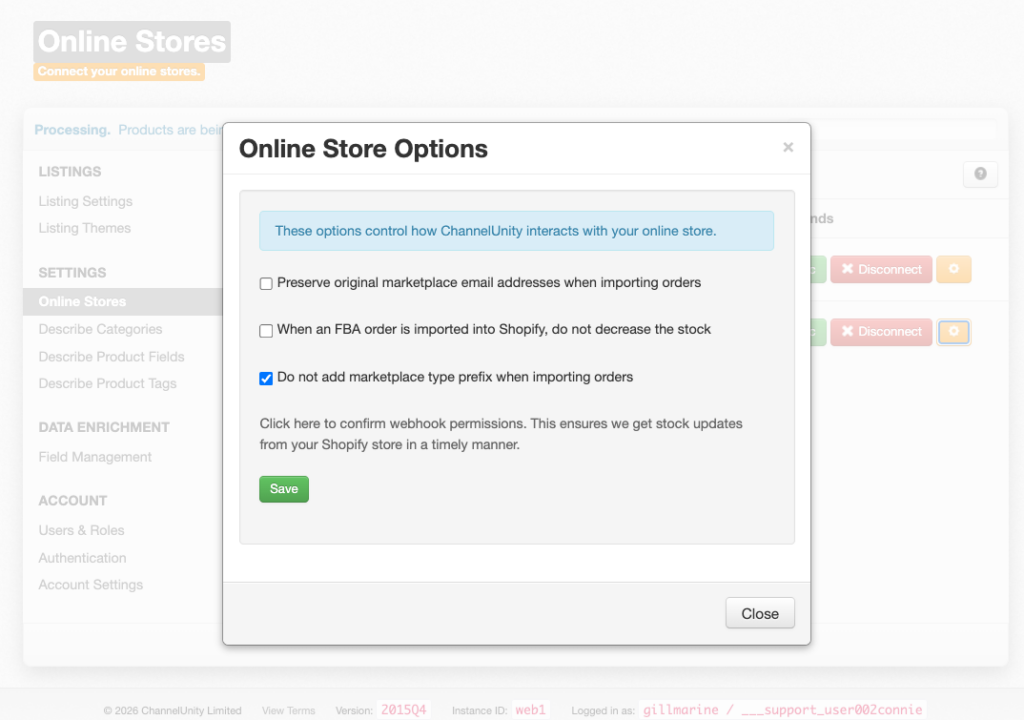
If you would prefer Shopify orders to use the original marketplace order number without the prefix, you can enable the Do not add marketplace type prefix when importing orders setting.
For example:
Before
After
How to enable the setting
- In ChannelUnity, go to Setup > Online Stores.
- Locate your Shopify store.
- Click the yellow cog next to the Shopify connection.
- Tick Do not add marketplace type prefix when importing orders.
- Click Save.
Important
- This setting only affects new orders imported after the setting has been enabled.
- Existing orders already imported into Shopify will not be updated.
- The original marketplace order number will be preserved, but the marketplace prefix (e.g AMZ_COM:) will no longer be added.